Live Test Runner
Save a file → the affected Jest or Vitest tests run → results show up in the editor. You don't need a terminal or any config changes.
Quick start
- Open a Jest or Vitest project — a single folder, a monorepo or a multi-root workspace (see Monorepos).
- Click the beaker icon in the Activity Bar. Tests are discovered right away.
- Click ▶ Start Testing. The full suite runs once.
- Edit and save. The affected tests rerun automatically.
Test Explorer
Shows the sidebar tree of every test file, suite and test.
- Instant tree: test files are parsed statically (Babel AST) when the extension starts, so nothing has to run first.
- Discovery cache: parsed results are cached per project and keyed by file modification time, so reopening a project is fast.
- Live updates: creating, editing or deleting a test file updates the tree.
- Dynamic tests:
test.eachand template-literal names appear as a template that fills in with the real cases after a run. - Coverage tab: project totals plus a per-file list. Click a row to open the file.
Test files match *.test.* or *.spec.* with js, ts, jsx, tsx, mjs or cjs. node_modules is skipped.
Reruns on save
| You save… | What runs |
|---|---|
| A test file | That whole file. |
| A source file with trace data | Only the tests that executed that file (suites with shared state run as a whole). |
| A source file with no trace data | jest --findRelatedTests, which uses Jest's import graph. |
- Debounced per file (
onSaveDebounceMs, default 300 ms). - Files run in batches across parallel Jest processes. Results stream in file by file.
- If an instrumented batch returns no results, those files are retried with plain Jest, one at a time. This is logged as a warning.
Editor integration
| Where | What you see |
|---|---|
| Gutter | ✓ passed · ✗ failed · ⟳ running · ○ pending / skipped |
| After the line | Test / suite duration, colour-coded by durationThresholds |
| CodeLens | ▶ Run this test or suite · ▷ Debug · ◈ Results jumps to it in the panel |
| Status bar | Live Tests: ✅ 12 passed. Click it to open the panels. |
Results panel
Opens in the bottom panel and has three columns: test list · console output (tabs per level: log / info / warn / error) · errors.
- Select a file, suite or test to scope the output and errors to it.
- Output is stored per scope. Jest reports console output per file, so a single test only has its own output after you rerun that test on its own. Until then it shows a placeholder; output from other scopes is never copied in. Vitest says which test or suite printed each line, so with Vitest every test shows its own output right away.
- Each log line has a copy button.
Code coverage
Coverage is collected during normal runs. There's no extra pass or command.
| Bar | Meaning |
|---|---|
| ▌ green | Covered |
| ▌ amber | Partially covered (some branches missed) |
| ▌ red | Never executed |
| ▌ grey | Not executable |
- Badge:
Stmts · Branch · Fns · Linesin the Explorer. - Hover a line to see the covering tests and which branch arms were missed (Jest and Vitest).
- Stale overlay: a grey tint on a saved file until its rerun finishes.
- Files no test imports count as 0%, so totals cover the whole project.
Debugging
▷ Debug starts a VS Code Node debug session for exactly that test or suite: Jest runs in band, Vitest runs with --no-file-parallelism and no timeouts (child processes attach automatically). Breakpoints in tests and source files work as usual.
Vitest
Vitest projects work like Jest ones: open the folder, click ▶ Start Testing. The framework is detected from the project (a vitest dependency or a vitest.config.*, and no Jest config).
- Versions: Vitest 3 or newer is fully supported. Vitest 1–2 run with results only (no test listing, related tests or line numbers). Vitest 5 needs Node ≥ 22.12 on your
PATH. - Your config wins: the extension runs the project's own Vitest with its config, plus the config flags from your
testscript (--config,--project,--root, …). Files outsideincludeare not run. - Console output per test: Vitest says which test or suite printed each line, so every test shows its own output after any run.
- Failures: the expected / received diff and the source-mapped line. A failing
beforeAllshows its real error and marks the file failed. - Coverage uses Vitest's own provider. Install
@vitest/coverage-v8(or-istanbul, whichever your config names); without it the log says once that coverage is off. Nothing is written into your project'scoverage/folder. - Projects: a config with
test.projectsruns once from the root; Vitest runs every project. Browser-mode projects need real browsers, so they are left out unless you turn onvitestIncludeBrowserProjectsor your test script picks projects itself. - Execution trace (on by default,
vitestTrace): the extension records which lines each test runs — the coverage hover lists the covering tests, and saving a source file reruns only the tests that ran it (by name; a test file where every test did runs whole, with fresh coverage). It adds a small Vite plugin through a wrapper config in its own temp folder; your config, plugins and setup files apply as usual, andfn.toString()still returns the code you wrote. TypeScript and JSX lines are mapped back to your source, and so are.vue,.svelte,.astroand.markocomponents (script and template lines, through their Vite plugin's source map). Vitest 3vitest.workspace.*files and type-check (*.test-d.ts) files are fine. - When the trace is off — the setting is off, Vitest is older than 3, or a run with the wrapper failed (the batch is then rerun as configured and the log says why, once) — saving a source file reruns the test files that import it (
vitest related), live and with fresh coverage. Browser-mode projects (opt-in) always run without it. Savingvitest.config.*restarts the session. - Not yet: the Timeline Debugger.
Monorepos & multi-root workspaces
Every test project in the workspace is detected when you open it. None runs until you start it.
| Your layout | Projects |
|---|---|
A folder with its own test config (jest.config.*, vitest.config.*, package.json#jest, CRA) | One project — its config already covers its packages (Jest projects, Vitest test.projects) |
A monorepo root (pnpm-workspace.yaml, package.json#workspaces) without a test config | One project per package that has tests (a Jest / Vitest dependency, config or test script) |
| A multi-root workspace | Each folder, by the rules above |
- Project switcher: the row at the top of the Explorer (
web ▾ ● running ✓120 ✗2) lists every project with its state. Pick one and the tree, Results panel and status bar switch to it. Gutter icons, inline durations, CodeLens and coverage bars always show each file's own project — open a file of another package and you see its results; ▶ Run / ▷ Debug there run in that package. Also: Select Project in the Command Palette. - Start / Stop act on the project shown. The others keep running — and rerunning on save — in the background; switch back to see their progress.
- How many at once:
maxRunningProjects(auto= 2, or 1 on machines with ≤ 4 CPU cores or less than 8 GB of memory (total RAM)). Starting one more asks you to stop a running project first and names the running ones. Stop All Projects stops them all. - Vitest projects: a package whose config has
test.projectsis one project; its files are grouped by Vitest project name in the tree. - Pin one root: Select Project Root (or
liveTestRunner.projectRoot) limits Live Test Runner to that folder, exactly as before 3.1; choose "Detect all projects" to go back. - The status bar shows the selected project and how many run:
Live Tests: web · ✅ 12 passed · 2 running.
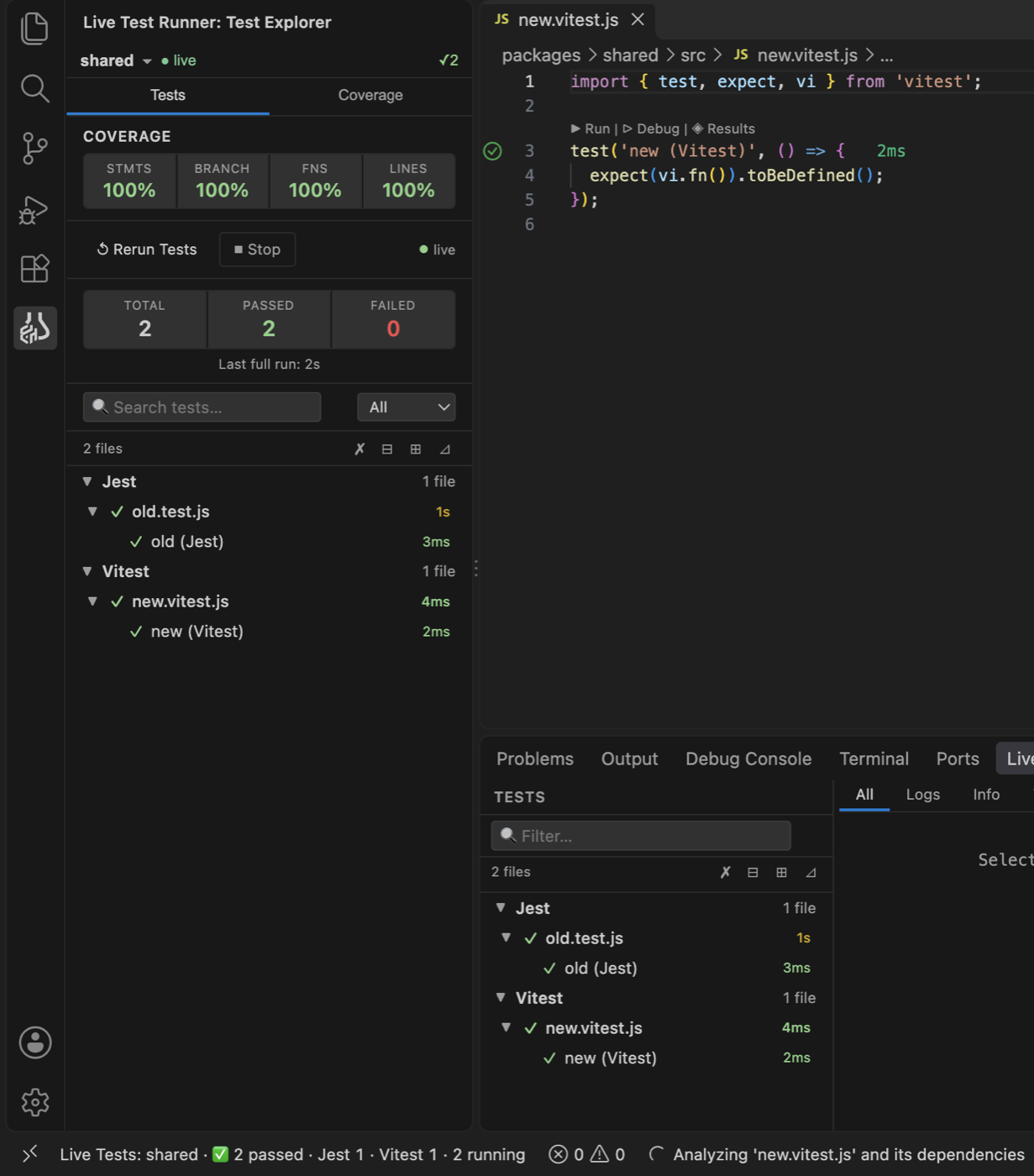
Jest and Vitest in one project
A project with a Jest config and its own vitest.config.* (e.g. while migrating) runs each test file with its own framework — binary, config, flags, coverage. A vitest dependency alone, or a vite.config.*, does not count: such projects stay Jest.
| Which framework runs a file | |
|---|---|
1. liveTestRunner.frameworks | The first matching glob wins, e.g. { "packages/new/**": "vitest" }. Also makes a Jest project without a Vitest config mixed. |
| 2. The configs | Only the Jest config lists it → Jest; only the Vitest config → Vitest. |
| 3. The file | Both list it: an import from vitest or a vi. call → Vitest; @jest/globals or a jest. call → Jest. Read again when you save the file. |
| 4. Nothing says | The project's main framework (Jest), with one warning in the log naming the setting. |
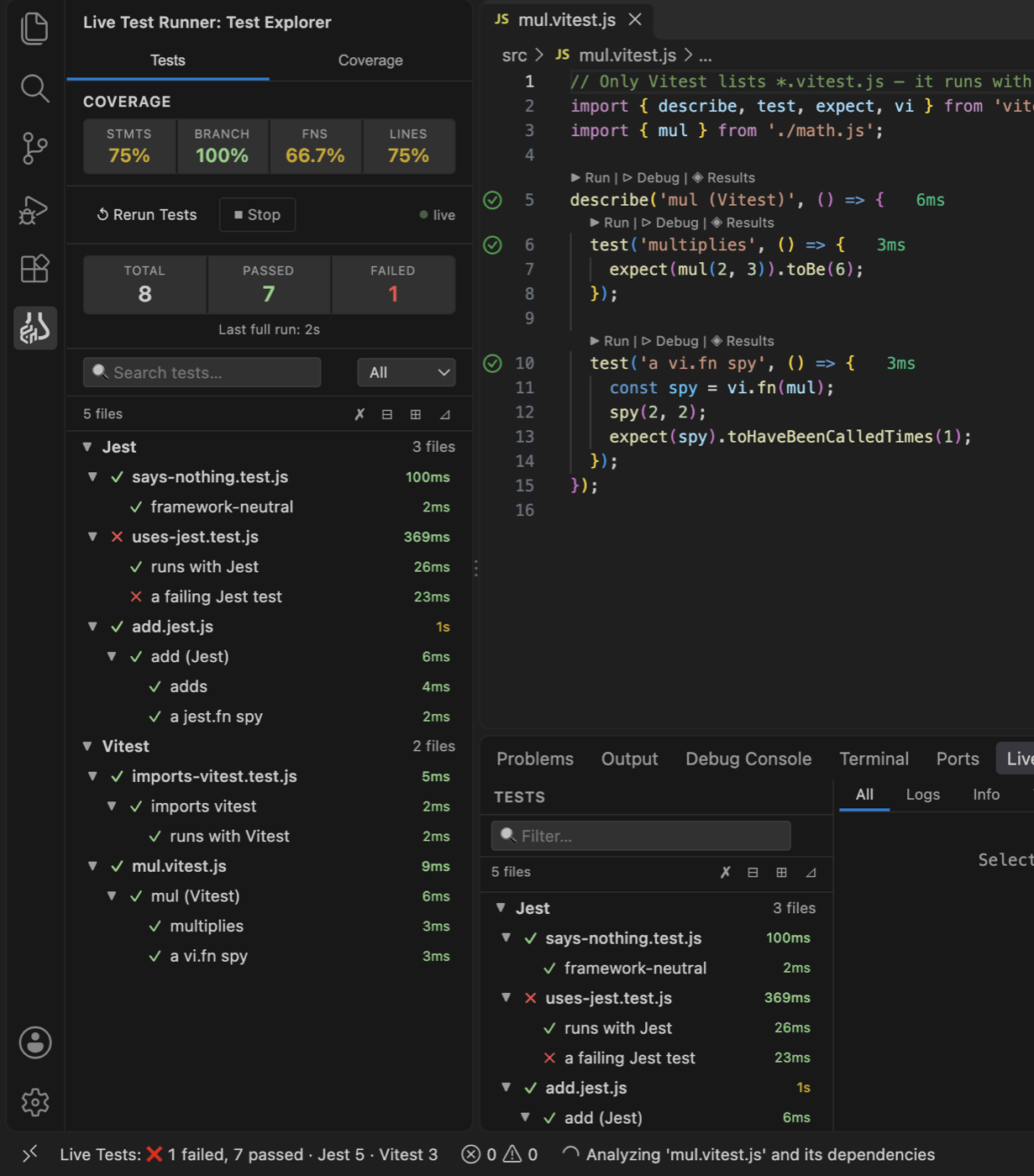
- The Explorer groups the files by framework; the switcher shows
jest + vitest; the status bar splits the counts:✅ 8 passed · Jest 5 · Vitest 3. - Saving a source file reruns the dependent tests of both frameworks, each by its own execution trace (Vitest falls back to
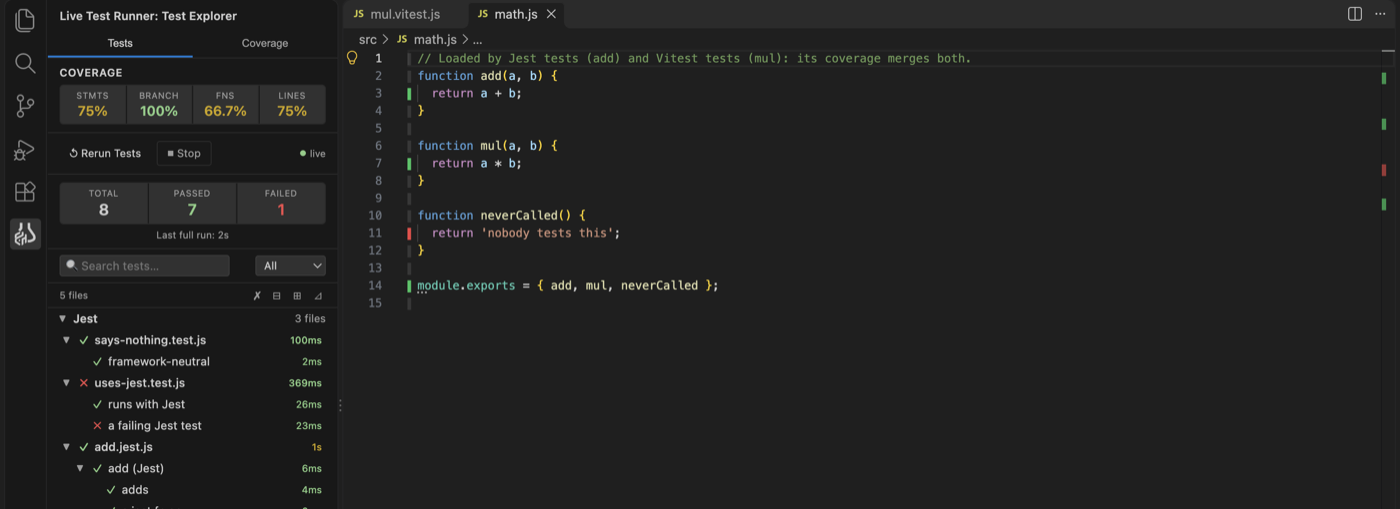
vitest relatedwhen its trace is off). Saving either config restarts the session. - Coverage: a source file tested by both shows the lines either framework ran.
- Stop kills both frameworks' processes. "Covering tests" on hover list tests of both frameworks; the Timeline debugger works for the Jest files only.
- In a monorepo each package is still its own project; only a package with both configs is mixed.
Timeline Debugger (preview)
Re-runs one test with full instrumentation, then lets you replay it step by step. Jest only — not available for Vitest yet.
- Play / step / scrub through each executed line.
- Variable values shown as ghost text in the editor.
- Sidebar with State, Watch and Call Stack. Use Add to Watch from the hover.
- Console output tied to the step that produced it.
Open it from a test in the Results panel. Leave it with the exit button.
Commands
Command Palette → type Live Test Runner.
| Command | Does |
|---|---|
| Start Testing | Runs everything and starts watching for saves |
| Stop Testing | Ends the session and kills running Jest / Vitest processes |
| Stop Testing and Clear Cache | Stop, then wipe the discovery cache (Shift+Delete in the views) |
| Clear Cache and Restart Testing | Wipe the results and cache, rediscover tests and run them all again |
| Select Project | Switch the project the views show (the Explorer's switcher row) |
| Select Project Root | Pin Live Test Runner to one folder, or back to every detected project |
| Stop All Projects | Stops every running project |
| Show Logs | Opens the Live Test Runner log (levelled) |
| Show Test Output | Opens the raw Jest / Vitest output |
| Open Guide | Opens this guide in an editor tab |
| Copy Diagnostic Report | Copies versions, project setup, settings and recent logs for a bug report |
| Open Timeline Debugger | Traces a single test |
| Show All Covering Tests | Quick Pick of every test that ran a line |
| Dump Trace Store (devMode) | Prints the internal trace indexes |
Settings
All under liveTestRunner.*.
| Setting | Default | What it does |
|---|---|---|
projectRoot | "" | Pin to one project folder. Empty: every test project in the workspace is detected. |
maxRunningProjects | "auto" | Projects running at once: auto = 2 (1 on ≤ 4 cores or < 8 GB total memory), or a number |
runMode | auto | auto calls Jest directly. npm uses npm test -- (Jest only). |
jestCommand | "" | Override the Jest binary or command. |
vitestCommand | "" | Override the Vitest command (e.g. npx vitest). Empty = the project's own Vitest. |
frameworks | {} | Jest + Vitest projects: glob → "jest" / "vitest", which framework runs those test files (see Jest and Vitest in one project). |
vitestTrace | true | Vitest execution trace: covering tests in the hover, and a saved source file reruns only the tests that ran it. Off: Vitest runs exactly as configured and saves use vitest related. |
vitestIncludeBrowserProjects | false | Also run Vitest browser-mode projects. They need real browsers, so they are left out by default (unless the test script picks projects itself). |
onSaveDebounceMs | 300 | Wait after a save before running. |
durationThresholds.* | 100 / 500 ms … | When test, suite and file durations turn amber or red. |
coverageThresholds.red / amber | 50 / 80 | Coverage % colour bands. |
devMode | false | Enables developer commands. |
Logs & troubleshooting
Two output channels
| Channel | Contains | Use it to… |
|---|---|---|
| Live Test Runner | The extension's own log: timestamps, levels, one summary per run | Find out what the extension did and why |
| Live Test Runner: Test Output | Jest's raw output, ANSI-free, each line tagged [jest#N] | See what Jest printed |
Levels
error something broke and needs action · warning degraded but recovered (fallbacks, files that failed to run) · info milestones and run summaries · debug / trace details, hidden by default
Change the level: Output panel → pick Live Test Runner → ⚙ → Set Log Level. Or Command Palette → Developer: Set Log Level…. The level also applies inside the Jest process, so debug detail from instrumentation shows up too.
Reading a session
[info] [Extension] Live Test Runner v2.0.3 · VS Code 1.95.0 · win32-x64 · Node 20.18.0
[info] [Extension] Project root: c:\work\shop
[info] [Discovery] Discovered 412 test(s) in 58 file(s) in 0.9s (55 from cache, 3 parsed)
[info] [Session] Session started — 58 test file(s) · framework: jest · root: c:\work\shop
[info] [Session] Run #1 full suite — 58 file(s) · 409 passed · 3 failed · 21.4s — failing: cart.test.ts
[info] [Session] Run #2 save cart.ts — 2 file(s) · 31 passed · 0 failed · 2.2s- Run #N numbers each run. The Test Output channel has a matching
──── Run #N ────separator. - b7 (batch) and jest#12 (process) tags link debug lines to raw output.
- Identical lines in a row are collapsed into "previous message repeated N more times".
Common warnings
| Message | Meaning / what to do |
|---|---|
instrumented Jest run returned no results … Jest said: | Jest failed before running tests (config, transform, environment). The lines after it are Jest's own error. Often a config format we don't read yet (BUG-07). |
falling back to plain Jest, one file at a time | Tests still run, but more slowly and without coverage or smart reruns for those files. |
<file> failed to run — … | The test file could not execute (syntax error, missing module, setup crash). |
could not instrument <file> | That source file runs without coverage. Set the level to Debug to see the parse error. |
falling back to "npx jest" | No local Jest found. Run npm install or set jestCommand. |
no file has finished in 60s — … currently on X | A batch made no progress. If the next warning names a different file, tests are just slow. If it names the same file, a test there is probably hanging (BUG-23). |
… was still running in b3 — cancelling b3 | A save reran a file that a bigger batch was running. That batch's unfinished files are retried, more slowly. |
Trace finished … captured 0 steps | The timeline matched no test, or the transform didn't apply (BUG-12). |
Reporting a bug
- Set the log level to Debug and reproduce the problem.
- Run Copy Diagnostic Report. It opens and copies a Markdown report with versions, project setup and the last 300 log lines.
- Check it for anything private, then attach it to the issue.
Support & limits
Jest covers babel-jest, ts-jest and @swc/jest; Create React App (react-scripts 4 / 5) has its Jest config extracted automatically. Vitest 3+ is fully supported, Vitest 1–2 run with results only; the framework is detected from the project (a project that lists Vitest but configures Jest runs on Jest).
Any UI framework. React, Preact, Solid, Lit, Angular and Qwik code is plain JS / TS. Vue, Svelte, Astro and Marko components are compiled by your project's own Jest transformer (vue-jest, svelte-jester…) or Vite plugin, and the extension maps them back to their own lines: saving a component reruns the tests that use it, the coverage hover lists the tests that ran each of its lines, and coverage counts it (an untested component counts from its <script>). Other file types count too when your tests load them — an Angular templateUrl, an HTML file imported with ?raw, a template a plugin reads: saving one reruns the tests that use it. More generally: any extension in your Jest config's moduleFileExtensions (e.g. Angular .html templates) reruns its tests on save, and the Vitest trace reaches any file a Vite plugin compiles. With Jest, coverage of a Vue component counts its <script> block only (as jest --coverage does — vue-jest maps only that), but template lines still show the tests that rendered them. Jest's ESM mode is picked up from your test script (NODE_OPTIONS=--experimental-vm-modules jest) or .npmrc (node-options=--experimental-vm-modules) — needed for ESM-only projects and Svelte 4+ with svelte-jester; if a file still fails to load as an ES module, the log says what to change.
| Feature | Jest | CRA | Vitest |
|---|---|---|---|
| Run & pass/fail | ✅ | ✅ | ✅ |
| ▶ Run / ▷ Debug one test or suite | ✅ | ✅ | ✅ |
| Rerun a saved test file | ✅ | ✅ | ✅ |
| Logs / console output | ✅ per file | ✅ per file | ✅ per test |
| Coverage (gutter, hover) | ✅ | ✅ | ✅ needs @vitest/coverage-v8 (or -istanbul) |
| Live per-file progress | ✅ | ✅ | ✅ |
| Rerun tests related to a saved source file | ✅ | ✅ | ✅ only the tests that ran it (execution trace); vitest related when the trace is off |
| Monorepo / multi-project (project switcher) | ✅ one project per package; a root projects config stays one | 🟡 a CRA app is detected as a package (not e2e-tested) | ✅ one project per package; test.projects stays one, grouped by name |
| Mixed Jest + Vitest in one project | ✅ each test file runs with its own framework | — | ✅ |
| Execution trace / "covering tests" | ✅ | ✅ | ✅ Vitest ≥ 3 (incl. vitest.workspace files); not in browser mode |
UI components (.vue, .svelte, .astro, .marko): save reruns, trace, coverage | ✅ through the project's transformer (vue-jest, svelte-jester…) | — (React is plain JS) | ✅ through the project's Vite plugins |
| Timeline debugger | ⏳ | ⏳ | ⏳ later |
- Single-test reruns use
--testNamePattern, so tests with overlapping names can run together. - Jest captures console output per file; per-test output needs an individual rerun. Vitest attributes output per test.
- Instrumented runs raise
testTimeoutto at least 30 s to absorb the instrumentation overhead.
How a run works
- Jest always runs in a spawned child process, never inside the extension host.
- The live reporter appends one JSON line per finished file. The extension polls that file, so results stream in.
- One pass collects results, coverage counters and line hits together.
- Instrumentation messages reach the log through a small protocol: stderr lines
[LTR:<level>] msg.
Where things appear in VS Code
Live Tests: ✅ 12 passedArchitecture
| Package | Role | Depends on |
|---|---|---|
runner | Spawns Jest, detects the framework (Jest / CRA), resolves the binary, parses results, shared logger | — |
core | Session lifecycle, coverage map | runner |
vscode-extension | UI, stores, instrumentation, VS Code wiring | core |
- Observer pattern:
SessionManagerpushes events toIResultObservers. New UI = new observer. - Adapter pattern: one adapter per framework in
runnerplus one in the extension. - One source of truth:
ResultStorefor results, trace files on disk for trace indexes. - Isolation: each VS Code window gets its own
session-<pid>-<ts>temp folder. - Projects: one
ProjectContextper test project (its stores, discovery, framework services and session); the views show the selected one.
More detail: architecture.md · developer-guide.md
Known issues
All known bugs, with root-cause analysis and suggested fixes, are tracked in bugs-and-issues.md. The open ones: